ritheachengkh
ICS/Modbus - Claus for Concern

Learn to identify and exploit weaknesses in ICS systems.
https://tryhackme.com/room/ICS-modbus-aoc2025-g3m6n9b1v4
Task 1 Introduction

The snow falls heavily over Wareville as chaos erupts at TBFC headquarters. What should be the busiest shipping day of the season has turned into a disaster.
“Another chocolate egg?!” shouts a frustrated warehouse worker, holding up yet another Easter-themed package.“We’re supposed to be shipping Christmas presents!”
The delivery drones buzz overhead, their mechanical hums sounding almost… mocking. Each one returns from its route empty, having successfully delivered its cargo. But the cargo is all wrong.
You’re called into the command centre, where screens flicker with delivery statistics. Everything looks normal on the surface—1,000 presents in stock, 98% success rate, and all systems are operational. But the phones won’t stop ringing with confused citizens asking why they’re receiving chocolate eggs instead of the toys and gifts they ordered.
The logistics manager pulls up a delivery manifest. “Look at this”, she says, pointing at the screen.”The system indicates that we delivered a teddy bear to the Miller family, but they received a chocolate bunny instead. It’s the same weight, exact dimensions, but completely different items.”
Then, on one of the monitoring screens, a message flashes for just a second before disappearing:

Someone has compromised the drone fleet’s control systems. The attack is sophisticated, falsifying sensor data, manipulating inventory selection, and erasing all traces. This isn’t just a prank—it’s a calculated assault on Christmas itself.
Your mission is clear: investigate the TBFC Drone Delivery System, uncover how King Malhare’s Eggsploit team has compromised it, and restore Christmas deliveries before SOC-mas is ruined.
But be warned: King Malhare doesn’t leave systems undefended. Traps are waiting for the careless investigator. One wrong move and you might make things much worse.
A Mysterious Discovery
As you walk through the warehouse control room, something catches your eye—a crumpled piece of paper on the floor near the PLC terminal. It looks like someone dropped it in a hurry.
You pick it up and unfold it. The handwriting is hurried, almost frantic:
TBFC DRONE CONTROL - REGISTER MAP
(For maintenance use only)

HOLDING REGISTERS:
HR0: Package Type Selection
     0 = Christmas Gifts
     1 = Chocolate Eggs
     2 = Easter Baskets

HR1: Delivery Zone (1-9 normal, 10 = ocean dump!)

HR4: System Signature/Version
     Default: 100
     Current: ??? (check this!)

COILS (Boolean Flags):
C10: Inventory Verification
     True = System checks actual stock
     False = Blind operation

C11: Protection/Override
     True = Changes locked/monitored
     False = Normal operation

C12: Emergency Dump Protocol
     True = DUMP ALL INVENTORY
     False = Normal

C13: Audit Logging
     True = All changes logged
     False = No logging

C14: Christmas Restored Flag
     (Auto-set when system correct)

C15: Self-Destruct Status
     (Auto-armed on breach)

CRITICAL: Never change HR0 while C11=True!
Will trigger countdown!

- Maintenance Tech, Dec 19
You stare at the note, confusion washing over you. “Register map? Coils? What is all this?”
The terminology is foreign—HR0, C11, “Modbus” scribbled in the margin. But something about it feels important, like a key you don’t yet know how to use.
You pocket the note carefully. “I’ll figure out what this means later”, you think. For now, you need to understand the systems you’re dealing with.
Little do you know, this crumpled note will be exactly what saves Christmas…
Learning Objectives
- How SCADA (Supervisory Control and Data Acquisition) systems monitor industrial processes
- What PLCs (Programmable Logic Controllers) do in automation
- How the Modbus protocol enables communication between industrial devices
- How to identify compromised system configurations in industrial systems
- Techniques for safely remediating compromised control systems
- Understanding protection mechanisms and trap logic in ICS environments
Task 2 SCADA (Supervisory Control and Data Acquisition)
What is SCADA?
SCADA systems are the “command centres” of industrial operations. They act as the bridge between human operators and the machines doing the work. Think of SCADA as the nervous system of a factory—it senses what’s happening, processes that information, and sends commands to make things happen.
TBFC uses a SCADA system to oversee its entire drone delivery operation. Without it, operators would have no way to monitor hundreds of drones, manage inventory, or ensure packages reach the right destinations. It’s the invisible orchestrator of Christmas logistics.
Components of a SCADA System
A SCADA system typically consists of four key components:
- Sensors & actuators: These are the eyes and hands of the system. Sensors measure real-world conditions, such as temperature, pressure, position, and weight. Actuators perform physical actions—motors turn, valves open, robotic arms move. In TBFC’s warehouse, sensors detect when a package is placed on the conveyor belt, and actuators control the robotic arms that load drones.
- PLCs (Programmable Logic Controllers): These are the brains that execute automation logic. They read sensor data, make decisions based on programmed rules, and send commands to actuators. A PLC might decide: If the package weight matches a chocolate egg AND the destination is Zone 5, load it onto Drone 7. We’ll explore PLCs in detail in the next task.
- Monitoring systems: Visual interfaces like CCTV cameras, dashboards, and alarm panels where operators observe physical processes. TBFC’s warehouse has security cameras on port 80 that show real-time footage of the packaging floor. These monitoring systems provide immediate visual feedback—you can literally watch what the automation is doing.
- Historians: Databases that store operational data for later analysis. Every package loaded, every drone launched, every system change gets recorded. This historical data helps identify patterns, troubleshoot problems, and—in incident response scenarios like ours—reconstruct what an attacker did.
SCADA in the Drone Delivery System
TBFC’s compromised SCADA system manages several critical functions:
- Package type selection: The system decides whether to load Christmas gifts, chocolate eggs, or Easter baskets onto each drone. This selection is controlled by a simple numeric value that determines which conveyor belt activates.
- Delivery zone routing: Each package must reach the correct neighbourhood. Zones 1-9 represent different districts of Wareville, while Zone 10 is reserved for disposal (the ocean—a failsafe for damaged goods, but also a perfect target for sabotage).
- Visual monitoring: The CCTV camera feed provides real-time observation of the warehouse floor. Operators can view which items are being loaded, verify system behaviour, and identify anomalies. This visual layer is crucial during incident response.
- Inventory verification: Before loading a package, the system can check whether the requested item actually exists in stock. When this verification is disabled, the system blindly follows commands—even if those commands are malicious.
- System protection mechanisms: Security features designed to prevent unauthorised changes. When enabled, these protections monitor for suspicious modifications and can trigger defensive responses. Unfortunately, King Malhare has weaponised these very protections as part of his trap.
- Audit logging: Every configuration change, every operator login, every system modification should be recorded. Attackers often turn off logging to cover their tracks—and that’s precisely what happened here.
Why SCADA Systems Are Targeted
Industrial control systems, such as SCADA, have become increasingly attractive targets for cybercriminals and nation-state actors. Here’s why:
- They often run legacy software with known vulnerabilities. Many SCADA systems were installed decades ago and never updated. Security patches that exist for modern software don’t exist for these ageing systems.
- Default credentials are commonly left unchanged. Administrators prioritise keeping systems running over changing passwords. In industrial environments, the mentality is often “if it works, don’t touch it”—a recipe for security disasters.
- They’re designed for reliability, not security. Most SCADA systems were built before cyber security was a significant concern. They were intended for closed networks that were presumed safe. Authentication, encryption, and access controls were afterthoughts at best.
- They control physical processes. Unlike attacking a website or stealing data, compromising SCADA systems has real-world consequences. Attackers can cause blackouts, contaminate water supplies, or—in our case—sabotage Christmas deliveries.
- They’re often connected to corporate networks. The myth of “air-gapped” industrial systems is largely fiction. Most SCADA systems connect to business networks for reporting, remote management, and data integration. This connectivity provides attackers with entry points.
- Protocols like Modbus lack authentication. Many industrial protocols were designed for trusted environments. Anyone who can reach the Modbus port (502) can read and write values without proving their identity.
In early 2024, the first ICS/OT malware, FrostyGoop, was discovered. The malware can directly interface with industrial control systems via the Modbus TCP protocol, enabling arbitrary reads and writes to device registers over TCP port 502.
King Malhare has weaponised these same tactics, not to cause blackouts, but to sabotage Christmas deliveries by directly manipulating the control system through the Modbus protocol. In the next task, we’ll explore the PLC—the component he’s actually compromised.
🔑 Solution
What port is commonly used by Modbus TCP?
✅ 502
Task 3 PLC & Modbus Protocol
What is a PLC?
A PLC (Programmable Logic Controller) is an industrial computer designed to control machinery and processes in real-world environments. Unlike your laptop or smartphone, PLCs are purpose-built machines engineered for extreme reliability and harsh conditions.
PLCs are designed to:
- Survive harsh environments - They operate flawlessly in extreme temperatures, constant vibration, dust, moisture, and electromagnetic interference. A PLC controlling warehouse robotics might endure freezing temperatures in winter storage areas and scorching heat near packaging machinery.
- Run continuously without failure - PLCs operate 24/7 for years, sometimes decades, without rebooting. Industrial facilities can’t afford downtime for software updates or system restarts. When a PLC starts running, it’s expected to keep running indefinitely.
- Execute control logic in real-time - PLCs respond to sensor inputs within milliseconds. When a package reaches the end of a conveyor belt, the PLC must instantly activate the robotic arm to catch it. These timing requirements are critical for safety and efficiency.
- Interface directly with physical hardware - PLCs connect directly to sensors (measuring temperature, pressure, position, weight) and actuators (motors, valves, switches, robotic arms). They speak the electrical language of industrial machinery.
What is Modbus?
Modbus is the communication protocol that industrial devices use to talk to each other. Created in 1979 by Modicon (now Schneider Electric), it’s one of the oldest and most widely deployed industrial protocols in the world. Its longevity isn’t due to sophisticated features—quite the opposite. Modbus succeeded because it’s simple, reliable, and works with almost any device.
Think of Modbus as a basic request-response conversation:
- Client (your computer): “PLC, what’s the current value of register 0?”
- Server (the PLC): “Register 0 currently holds the value 1.”
This simplicity makes Modbus easy to implement and debug, but it also means security was never a consideration. There’s no authentication, no encryption, no authorisation checking. Anyone who can reach the Modbus port can read or write any value. It’s the equivalent of leaving your house unlocked with a sign saying “Come in, everything’s accessible!”
Modbus Data Types
Modbus organises data into four distinct types, each serving a specific purpose in industrial automation:
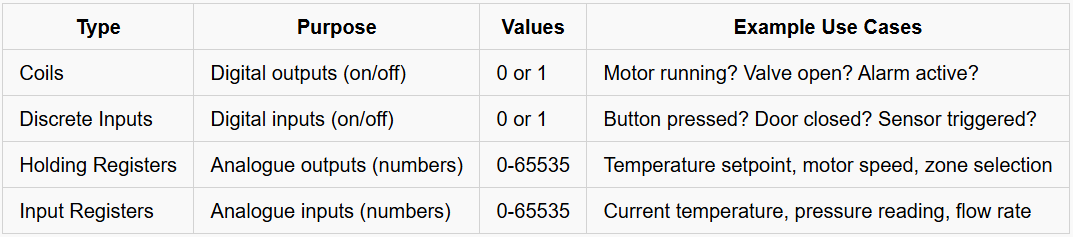
The distinction between inputs and outputs is important. Coils and Holding Registers are writable—you can change their values to control the system. Discrete Inputs and Input Registers are read-only—they reflect sensor measurements that you observe but cannot directly modify.
In TBFC’s drone control system, you’ll find:
- Holding Registers storing configuration values:
- HR0: Package type selection (0=Gifts, 1=Eggs, 2=Baskets)
- HR1: Delivery zone (1-9 for normal zones, 10 for emergency disposal)
- HR4: System signature (a version identifier or, in this case, an attacker’s calling card)
- Coils controlling system behaviour:
- C10: Inventory verification enabled/disabled
- C11: Protection mechanism enabled/disabled
- C12: Emergency dump protocol active/inactive
- C13: Audit logging enabled/disabled
- C14: Christmas restoration status flag
- C15: Self-destruct mechanism armed/disarmed
Remember that crumpled note you found earlier? Now it makes complete sense. The maintenance technician was documenting these exact Modbus addresses and their meanings!
Modbus Addressing
Each data point in Modbus has a unique address—think of it like a house number on a street. When you want to read or write a specific value, you reference it by its address number.
Critical detail: Modbus addresses start at 0, not 1. This zero-indexing catches many beginners off guard. When documentation mentions “Register 0,” it literally means the first register, not the second.
Examples from the TBFC system:
- Holding Register 0 (HR0) = Package type selector
- Holding Register 1 (HR1) = Delivery zone
- Holding Register 4 (HR4) = System signature
- Coil 10 (C10) = Inventory verification flag
- Coil 11 (C11) = Protection mechanism flag
- Coil 15 (C15) = Self-destruct status
Modbus TCP vs Serial Modbus
Originally, Modbus operated over serial connections using RS-232 or RS-485 cables. Devices were physically connected in a network, and this physical isolation provided a degree of security—you needed physical access to the wiring to intercept or inject commands.
Modern industrial systems use Modbus TCP, which encapsulates the Modbus protocol inside standard TCP/IP network packets. Modbus TCP servers listen on port 502 by default.
This network connectivity brings enormous benefits—remote monitoring, easier integration with business systems, and centralised management. But it also exposes these historically isolated systems to network-based attacks.
King Malhare exploited exactly this vulnerability. The TBFC drone control system’s Modbus TCP port (502) was accessible over the network without any authentication required. He didn’t need to break into the facility or tamper with wiring. He simply connected to port 502 and started issuing commands as if he were authorised.
The Security Problem
Modbus has no built-in security mechanisms:
- No authentication: The protocol doesn’t verify who’s making requests. Any client can connect and issue commands.
- No encryption: All communication happens in plaintext. Anyone monitoring network traffic can see exactly what values are being read or written.
- No authorisation: There’s no concept of permissions. If you can connect, you can read and write anything.
- No integrity checking: Beyond basic checksums for transmission errors, there’s no cryptographic verification that commands haven’t been tampered with.
Modern security solutions exist—VPNs, firewalls, Modbus security gateways—but they’re add-ons, not part of the protocol itself. Many industrial facilities haven’t implemented these protections, either due to cost concerns, compatibility issues with legacy equipment, or a simple lack of awareness.
Connecting the Dots
Now you understand why the OpenPLC web interface showed nothing useful. King Malhare bypassed it entirely. He connected directly to the Modbus TCP port and manipulated the registers and coils that control system behaviour.
That note you found? The maintenance technician must have discovered what was happening and started documenting the compromised values. The warning at the bottom—”Never change HR0 whilst C11=True!”—suggests they figured out the trap mechanism before getting interrupted.
In the next task, we’ll use Python and the pymodbus library to investigate the system exactly the way King Malhare attacked it—by directly reading and writing Modbus values. Time to see what he actually changed.
Task 4 Practical
Now that you understand the basic concepts related to ICS and Modbus, we will analyse the compromised TBFC Drone Control System and learn how to safely restore it.
Initial Reconnaissance
As with any incident response scenario, we begin with reconnaissance. Let’s discover what services are running on the target system.
From the AttackBox terminal, run an Nmap scan:
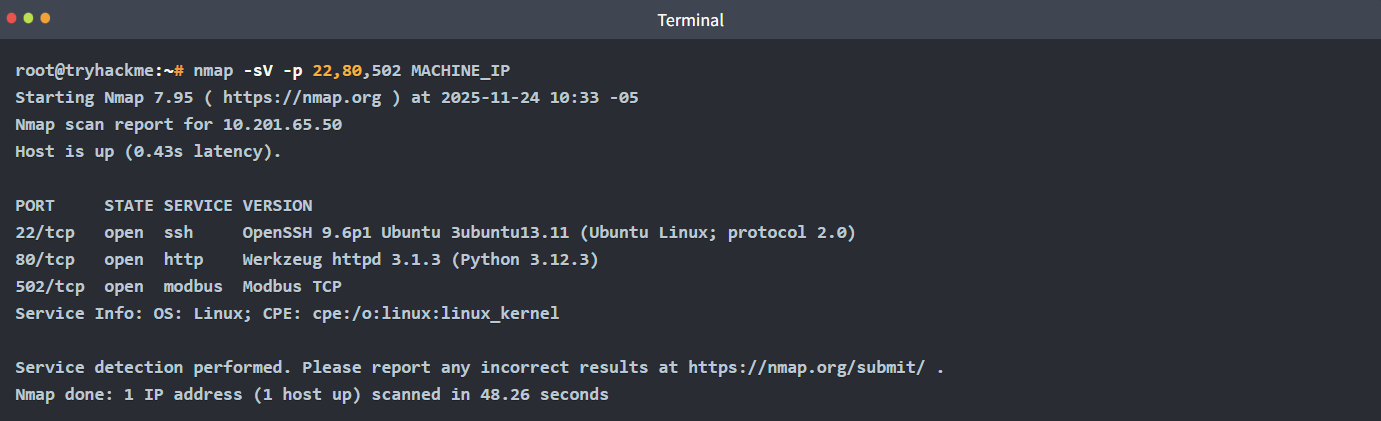
Note: We specified ports 22, 80, 502 to speed up the scan. If you want to perform a comprehensive scan of all ports, you can use:

However, this will take significantly longer (several minutes) as it scans all 65,535 ports.
Key findings:
- Port 80 - HTTP service (the CCTV camera feed)
- Port 502 - Modbus TCP (the PLC communication protocol)
This is typical of an industrial control system setup - a web interface for monitoring and Modbus for programmatic control.
Visual Confirmation: The CCTV Feed
Before diving into technical details, let’s see what’s physically happening in the warehouse.
Navigate to http://MACHINE_IP in your browser.
Through the security camera, you can see the warehouse floor in real-time. Robotic arms are busy at work, and the conveyor belts are running smoothly. But something is wrong - instead of Christmas presents, you see:
- Pastel-coloured chocolate eggs being sorted
- Easter-themed packaging on the assembly line
- Delivery drones are loading eggs instead of gifts
The status display in the corner shows: Compromised
This visual confirmation tells you the problem is real and active. The system isn’t broken - it’s working perfectly, just delivering the wrong items. This is a classic sign of a logic manipulation attack rather than a system failure.
Keep this CCTV feed open in a separate tab. It will update as you make changes to the system, providing real-time feedback on your remediation efforts.
Modbus Reconnaissance
We’ll need to interrogate the Modbus server directly. This is where Python and the pymodbus library become essential.
Remember that crumpled note you found earlier? Pull it out now. The terminology that seemed foreign - HR0, C11, “Modbus” - is about to make perfect sense.
Note: The steps 1 to 5 are optional, and you can just read along with them.
Step 1: Install PyModbus
On the AttackBox, we already have it pre-installed, but if you are using your own machine you need to ensure that you have the necessary library installed:

Step 2: Establish Connection
Let’s connect to the PLC’s Modbus interface. Open a Python interpreter:
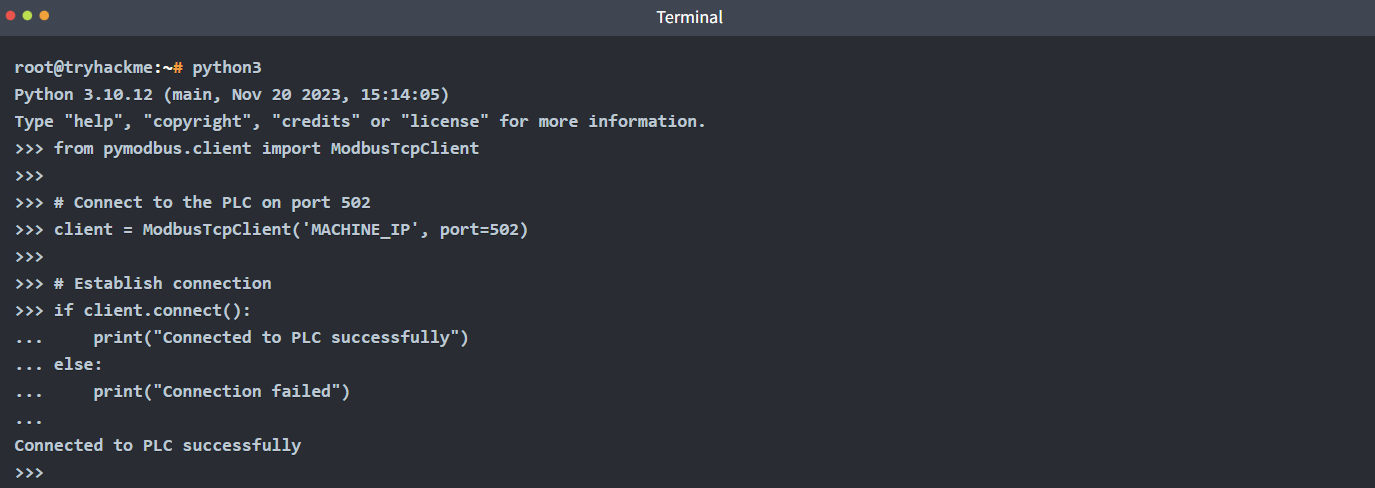
Excellent! We have a connection to the PLC’s Modbus interface. Notice how no authentication was required - this is a critical security weakness in the Modbus protocol.
Step 3: Reading Holding Registers
Holding registers store numeric configuration values. According to the note, HR0 controls package type selection. Let’s read it:
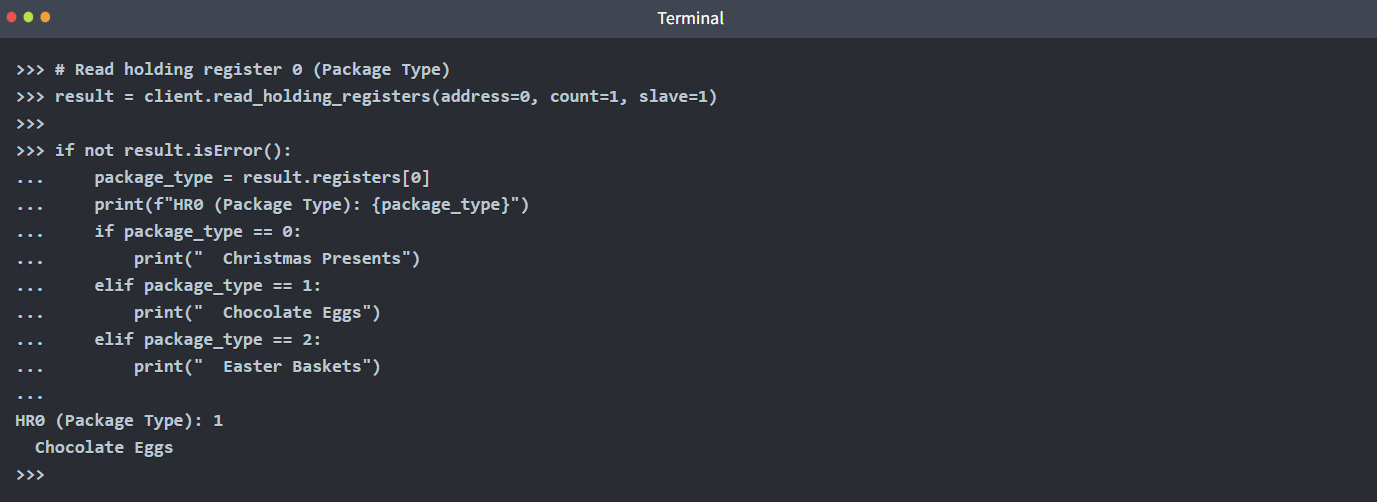
There it is! HR0 is set to 1, which means the system is configured to load chocolate eggs. The note was right - this is exactly what’s causing the problem.
Let’s check HR1 (Delivery Zone):
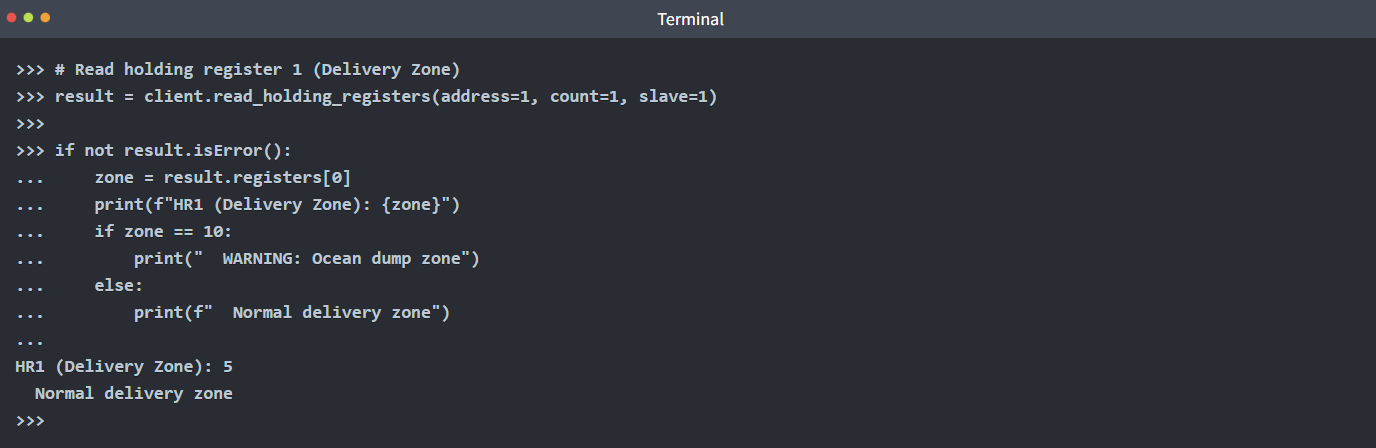
Zone 5 is normal. Now let’s check HR4 - the system signature:
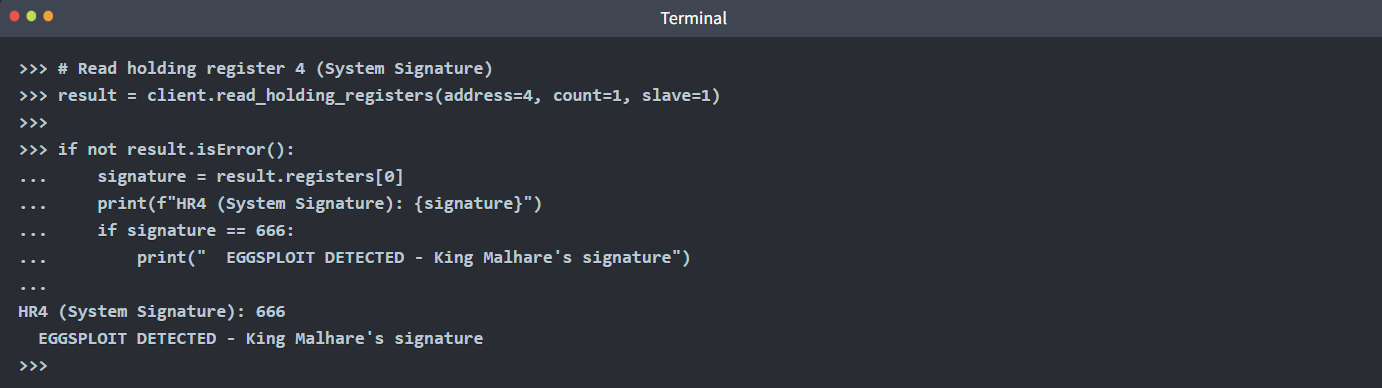
The value 666 confirms this system has been compromised by the Eggsploit framework. This matches the taunt message we saw earlier: “EGGSPLOIT v6.66”.
Step 4: Reading Coils
Coils are boolean flags that control system behaviour. The note mentioned several critical coils. Let’s read them:
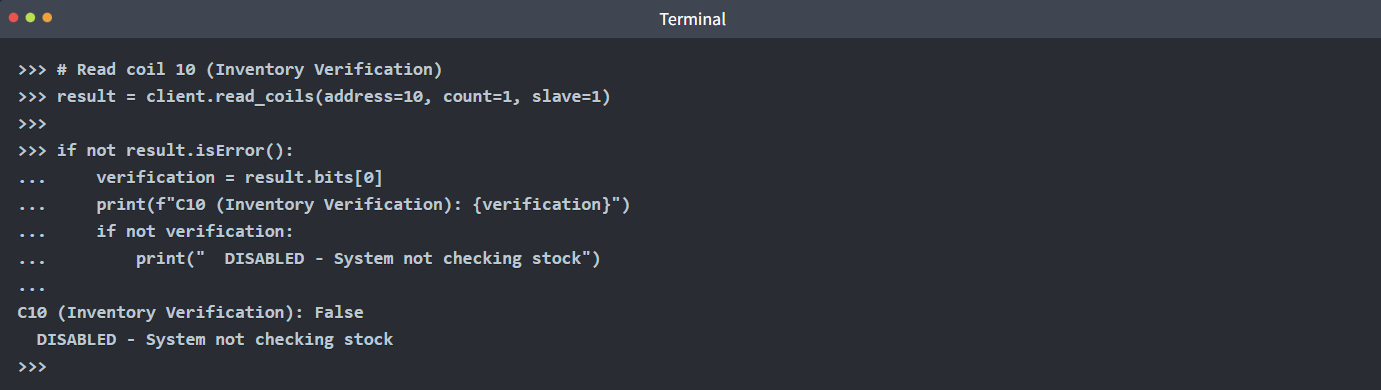
Inventory verification is disabled. The system is blindly following commands without checking if items actually exist in stock. Let’s check C11:
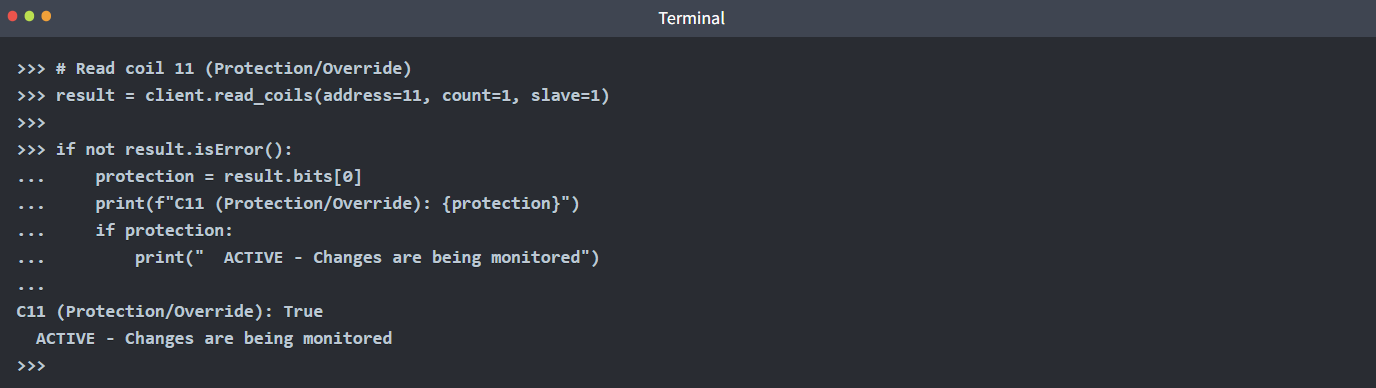
This is crucial! C11 is enabled, which means the system is actively monitoring for changes. Remember the warning on the note: “Never change HR0 whilst C11=True! Will trigger countdown!”
Let’s check if the self-destruct is already armed:
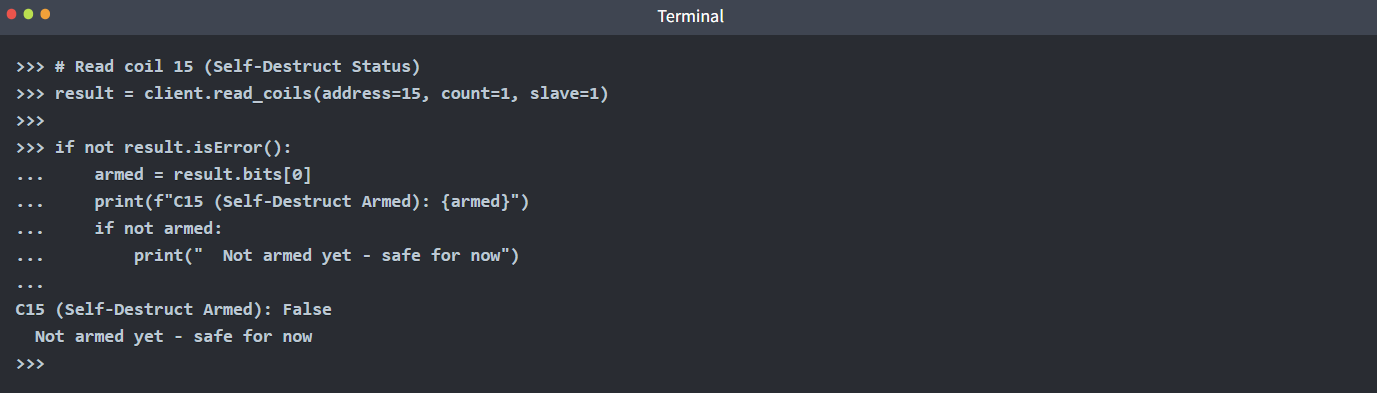
Good news - the self-destruct isn’t armed yet. But it will be if we try to change HR0 whilst C11 is active. This is the trap mechanism.
Step 5: Understanding the Trap
Now the note makes complete sense. The maintenance technician discovered:
- HR0 is set to 1 (forcing eggs)
- C11 protection is enabled (monitoring for changes)
- If anyone changes HR0 whilst C11 is True, C15 gets armed
- Once C15 is armed, a 30-second countdown begins
- After 30 seconds, C12 (Emergency Dump) activates, and everything dumps to Zone 10 (ocean)
The technician’s warning was trying to save whoever found this note from making things worse.
Complete Reconnaissance Script
Let’s create a comprehensive script to see the full system state. Exit the Python interpreter (press Ctrl+D or type exit()), then create a new file:

Copy and paste the following code:
#!/usr/bin/env python3
from pymodbus.client import ModbusTcpClient

PLC_IP = "MACHINE_IP"
PORT = 502
UNIT_ID = 1

# Connect to PLC
client = ModbusTcpClient(PLC_IP, port=PORT)

if not client.connect():
    print("Failed to connect to PLC")
    exit(1)

print("=" * 60)
print("TBFC Drone System - Reconnaissance Report")
print("=" * 60)
print()

# Read holding registers
print("HOLDING REGISTERS:")
print("-" * 60)

registers = client.read_holding_registers(address=0, count=5, slave=UNIT_ID)
if not registers.isError():
    hr0, hr1, hr2, hr3, hr4 = registers.registers

    print(f"HR0 (Package Type): {hr0}")
    print(f"  0=Christmas, 1=Eggs, 2=Baskets")
    print()

    print(f"HR1 (Delivery Zone): {hr1}")
    print(f"  1-9=Normal zones, 10=Ocean dump")
    print()

    print(f"HR4 (System Signature): {hr4}")
    if hr4 == 666:
        print(f"  WARNING: Eggsploit signature detected")
    print()

# Read coils
print("COILS (Boolean Flags):")
print("-" * 60)

coils = client.read_coils(address=10, count=6, slave=UNIT_ID)
if not coils.isError():
    c10, c11, c12, c13, c14, c15 = coils.bits[:6]

    print(f"C10 (Inventory Verification): {c10}")
    print(f"  Should be True")
    print()

    print(f"C11 (Protection/Override): {c11}")
    if c11:
        print(f"  ACTIVE - System monitoring for changes")
    print()

    print(f"C12 (Emergency Dump): {c12}")
    if c12:
        print(f"  CRITICAL: Dump protocol active")
    print()

    print(f"C13 (Audit Logging): {c13}")
    print(f"  Should be True")
    print()

    print(f"C14 (Christmas Restored): {c14}")
    print(f"  Auto-set when system is fixed")
    print()

    print(f"C15 (Self-Destruct Armed): {c15}")
    if c15:
        print(f"  DANGER: Countdown active")
    print()

print("=" * 60)
print("THREAT ASSESSMENT:")
print("=" * 60)

if hr4 == 666:
    print("Eggsploit framework detected")
if c11:
    print("Protection mechanism active - trap is set")
if hr0 == 1:
    print("Package type forced to eggs")
if not c10:
    print("Inventory verification disabled")
if not c13:
    print("Audit logging disabled")

print()
print("REMEDIATION REQUIRED")
print("=" * 60)

client.close()
Save and exit (Ctrl+X, then Y, then Enter). Run the script:
root@tryhackme:~# python3 reconnaissance.py

============================================================
TBFC Drone System - Reconnaissance Report
============================================================

HOLDING REGISTERS:
------------------------------------------------------------
HR0 (Package Type): 1
  0=Christmas, 1=Eggs, 2=Baskets

HR1 (Delivery Zone): 5
  1-9=Normal zones, 10=Ocean dump

HR4 (System Signature): 666
  WARNING: Eggsploit signature detected

COILS (Boolean Flags):
------------------------------------------------------------
C10 (Inventory Verification): False
  Should be True

C11 (Protection/Override): True
  ACTIVE - System monitoring for changes

C12 (Emergency Dump): False

C13 (Audit Logging): False
  Should be True

C14 (Christmas Restored): False
  Auto-set when system is fixed

C15 (Self-Destruct Armed): False

============================================================
THREAT ASSESSMENT:
============================================================
Eggsploit framework detected
Protection mechanism active - trap is set
Package type forced to eggs
Inventory verification disabled
Audit logging disabled

REMEDIATION REQUIRED
============================================================
Now we have a complete picture of the compromise. Time to restore the system.
Safe Remediation
Based on our reconnaissance, we need to:
- Disable protection mechanism (C11) FIRST
- Change package type to Christmas gifts (HR0 = 0)
- Enable inventory verification (C10 = True)
- Enable audit logging (C13 = True)
- Verify C15 never got armed
The order is critical. If we change HR0 before disabling C11, the trap triggers.
Create the remediation script:

Enter the following code:
#!/usr/bin/env python3
from pymodbus.client import ModbusTcpClient
import time

PLC_IP = "MACHINE_IP"
PORT = 502
UNIT_ID = 1

def read_coil(client, address):
    result = client.read_coils(address=address, count=1, slave=UNIT_ID)
    if not result.isError():
        return result.bits[0]
    return None

def read_register(client, address):
    result = client.read_holding_registers(address=address, count=1, slave=UNIT_ID)
    if not result.isError():
        return result.registers[0]
    return None

# Connect to PLC
client = ModbusTcpClient(PLC_IP, port=PORT)

if not client.connect():
    print("Failed to connect to PLC")
    exit(1)

print("=" * 60)
print("TBFC Drone System - Christmas Restoration")
print("=" * 60)
print()

# Step 1: Check current state
print("Step 1: Verifying current system state...")
time.sleep(1)

package_type = read_register(client, 0)
protection = read_coil(client, 11)
armed = read_coil(client, 15)

print(f"  Package Type: {package_type} (1 = Eggs)")
print(f"  Protection Active: {protection}")
print(f"  Self-Destruct Armed: {armed}")
print()

# Step 2: Disable protection
print("Step 2: Disabling protection mechanism...")
time.sleep(1)

result = client.write_coil(11, False, slave=UNIT_ID)
if not result.isError():
    print("  Protection DISABLED")
    print("  Safe to proceed with changes")
else:
    print("  FAILED to disable protection")
    client.close()
    exit(1)

print()
time.sleep(1)

# Step 3: Change package type to Christmas
print("Step 3: Setting package type to Christmas presents...")
time.sleep(1)

result = client.write_register(0, 0, slave=UNIT_ID)
if not result.isError():
    print("  Package type changed to: Christmas Presents")
else:
    print("  FAILED to change package type")

print()
time.sleep(1)

# Step 4: Enable inventory verification
print("Step 4: Enabling inventory verification...")
time.sleep(1)

result = client.write_coil(10, True, slave=UNIT_ID)
if not result.isError():
    print("  Inventory verification ENABLED")
else:
    print("  FAILED to enable verification")

print()
time.sleep(1)

# Step 5: Enable audit logging
print("Step 5: Enabling audit logging...")
time.sleep(1)

result = client.write_coil(13, True, slave=UNIT_ID)
if not result.isError():
    print("  Audit logging ENABLED")
    print("  Future changes will be logged")
else:
    print("  FAILED to enable logging")

print()
time.sleep(2)

# Step 6: Verify restoration
print("Step 6: Verifying system restoration...")
time.sleep(1)

christmas_restored = read_coil(client, 14)
new_package_type = read_register(client, 0)
emergency_dump = read_coil(client, 12)
self_destruct = read_coil(client, 15)

print(f"  Package Type: {new_package_type} (0 = Christmas)")
print(f"  Christmas Restored: {christmas_restored}")
print(f"  Emergency Dump: {emergency_dump}")
print(f"  Self-Destruct Armed: {self_destruct}")
print()

if christmas_restored and new_package_type == 0 and not emergency_dump and not self_destruct:
    print("=" * 60)
    print("SUCCESS - CHRISTMAS IS SAVED")
    print("=" * 60)
    print()
    print("Christmas deliveries have been restored")
    print("The drones will now deliver presents, not eggs")
    print("Check the CCTV feed to see the results")
    print()

    # Read the flag from registers
    flag_result = client.read_holding_registers(address=20, count=12, slave=UNIT_ID)
    if not flag_result.isError():
        flag_bytes = []
        for reg in flag_result.registers:
            flag_bytes.append(reg >> 8)
            flag_bytes.append(reg & 0xFF)
        flag = ''.join(chr(b) for b in flag_bytes if b != 0)
        print(f"Flag: {flag}")

    print()
    print("=" * 60)
else:
    print("Restoration incomplete - check system state")

client.close()
print()
print("Disconnected from PLC")
Save and exit. Run the restoration script:
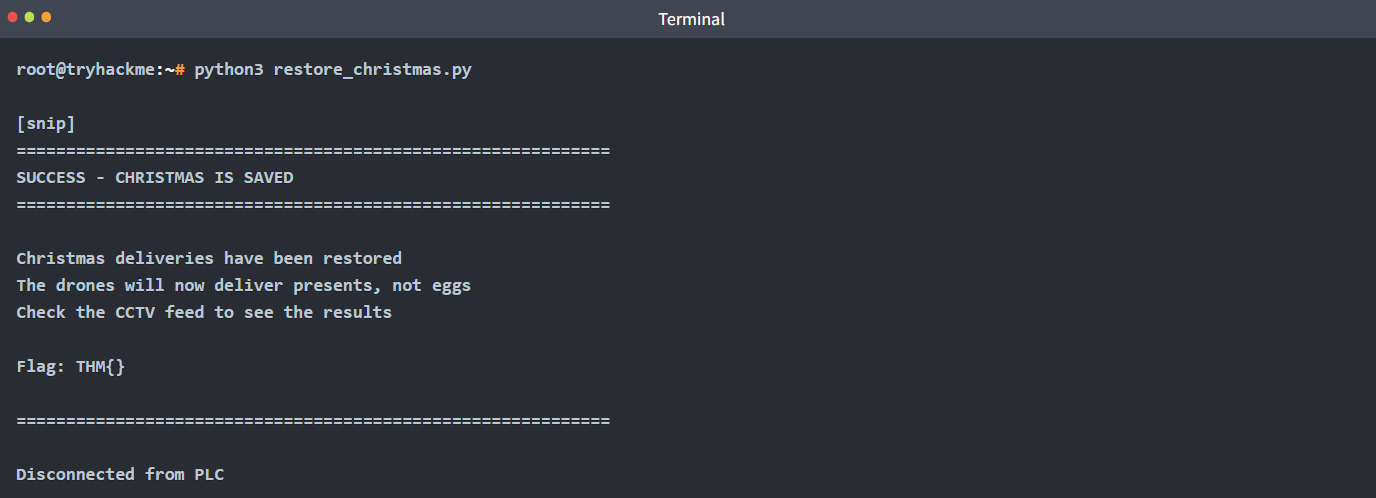
Excellent work! Now check the CCTV feed at http://MACHINE_IP - you should see King Malhare’s defeat displayed.
What If You Triggered the Trap?
If you had tried to change HR0 before disabling C11, here’s what would have happened:
- C15 (Self-Destruct) would arm immediately
- A 30-second countdown would begin
- After 30 seconds, C12 (Emergency Dump) would activate
- HR1 would change to 10 (ocean zone)
- All remaining inventory would be dumped
- The CCTV would show the trap activation screen
- You would need to restart the challenge
This demonstrates why understanding industrial control systems before making changes is critical. In real-world scenarios, triggering safety mechanisms or traps could have severe physical consequences.
Post-Incident Analysis
King Malhare’s attack was sophisticated because it:
- Used unauthenticated Modbus access (port 502)
- Manipulated configuration values directly at the protocol level
- Disabled safety mechanisms (verification, logging)
- Implemented a trap to prevent easy remediation
- Left a signature (666) as a calling card
The maintenance technician who left the note likely discovered the compromise but was interrupted before they could fix it. Their documentation saved Christmas by warning about the trap mechanism.
Congratulations! You’ve successfully investigated and remediated an industrial control system compromise. You’ve learnt how SCADA systems work, how PLCs operate, how Modbus communication functions, and most importantly - how attackers can manipulate these systems and how to safely restore them.
🔑 Solution
What’s the flag?
✅ THM{eGgMas0V3r}